Lightroom February 2026 Release: Guess What? More A.I. Garbage!
 Andy Hutchinson
11 min read
Andy Hutchinson
11 min read
Note: this is the extended article version of the review on YouTube that airs late on 24th of February
T
he crack team of software engineers at Adobe have committed the February builds to the repository and all across the world, eager photographers have downloaded the update to discover what amazing new features $240 US dollars per year buys anyone not grandfathered in to the old $10 deal. And I’m sure it shouldn’t come as a huge surprise to anyone that the new features are (mainly) more AI. We get AI photo editing, AI video generation, AI upscaling and, ermm, WebP support.

The Alternative Take Nobody Asked For
You may have noticed that I don’t tend to jump on the “this changes everything” bandwagon every time Adobe roll out a new release. But I updated and tested the new features and it left me more disillusioned than usual with the direction Adobe are heading in, and so I thought I would offer a counterpoint to the uncritical cavalcade of update videos that have no doubt littered your YouTube and social media feeds as well as mine.
Upscaling
Last year I did a video called Generative Credits in Photo Editors are the Next Big Grift and you don’t have to look very hard at this latest release to conclude that I’m basically a prophet.
The only good news to come out of all this is that Adobe seem to be slowly abandoning their own generative AI ambitions, with Firefly now relegated to a supporting role, while third party models like Nano Banana and Flux share the limelight.
You can only find the new generative upscaling tool in Lightroom, not in Lightroom Classic. There doesn’t appear to be any explanation for this other than ‘tough shit,’ but I guess it’s highly probable that they’ll eventually enable it in both versions.
The big news about this upscaling tool is that it exclusively uses Topaz Gigapixel, using the same exact upscale dialog they already added to Photoshop. Five years ago, the adoption of TopazLabs AI models in any Adobe software would have been a huge deal, but Topaz have done a better job than Tesla or Boeing of shitting on their own legacy and are now roughly as beloved as the company they’re now in bed with.
That being said, Topaz’s generative upscaling in Gigapixel is the least shit of all of their products, and so we should be thankful Adobe haven’t licensed their spectacularly awful face recovery algorithm as well.
There are no options other than 2x or 4x and you have absolutely no control over the upscaling process, unlike in the full version of Gigapixel where you can select custom sizes, DPI setting, sharpening, denoising, compression, gamma correction and grain using one of 10 different models.
Every upscale you make using this tool will cost you 20 credits, and that seems to be the case whether you opt for the 2x or the 4x options. That means that on the regular photography bundle which I suspect most of you Adobe users will be on, you get 12 upscales a month unless you buy more Adobe dollars, sorry, credits.
And on the face of it, that seems pretty reasonable, doesn’t it. How many photographers are going to want to upscale more than 12 photos a month? But remember those credits are your monthly wallet, spread across all of the metered AI tools in Adobe products. And further consider this: everything in Photoshop and Lightroom used to be included in your monthly subscription, but now they’ve got you used to the idea of the upsell. You used to be able to click on any menu item, any tool, any filter in Photoshop or Lightroom and just use it, but now you’ll see that little sparkle icon glinting at you like a pickpocket’s smile, and you’ll know that clicking it is going to cost you. Not a lot. Just a little. Just enough that you’ll think twice. Just enough that Adobe have successfully turned a flat-rate subscription into a subscription with a meter running in the background, and you didn’t even notice it happening.
And of course, it’s 20 credits per upscale now, but the way Adobe usually operate is to get everyone comfortable with the technology and then jack the price up, so we’ll see how long it stays at 20 credits.
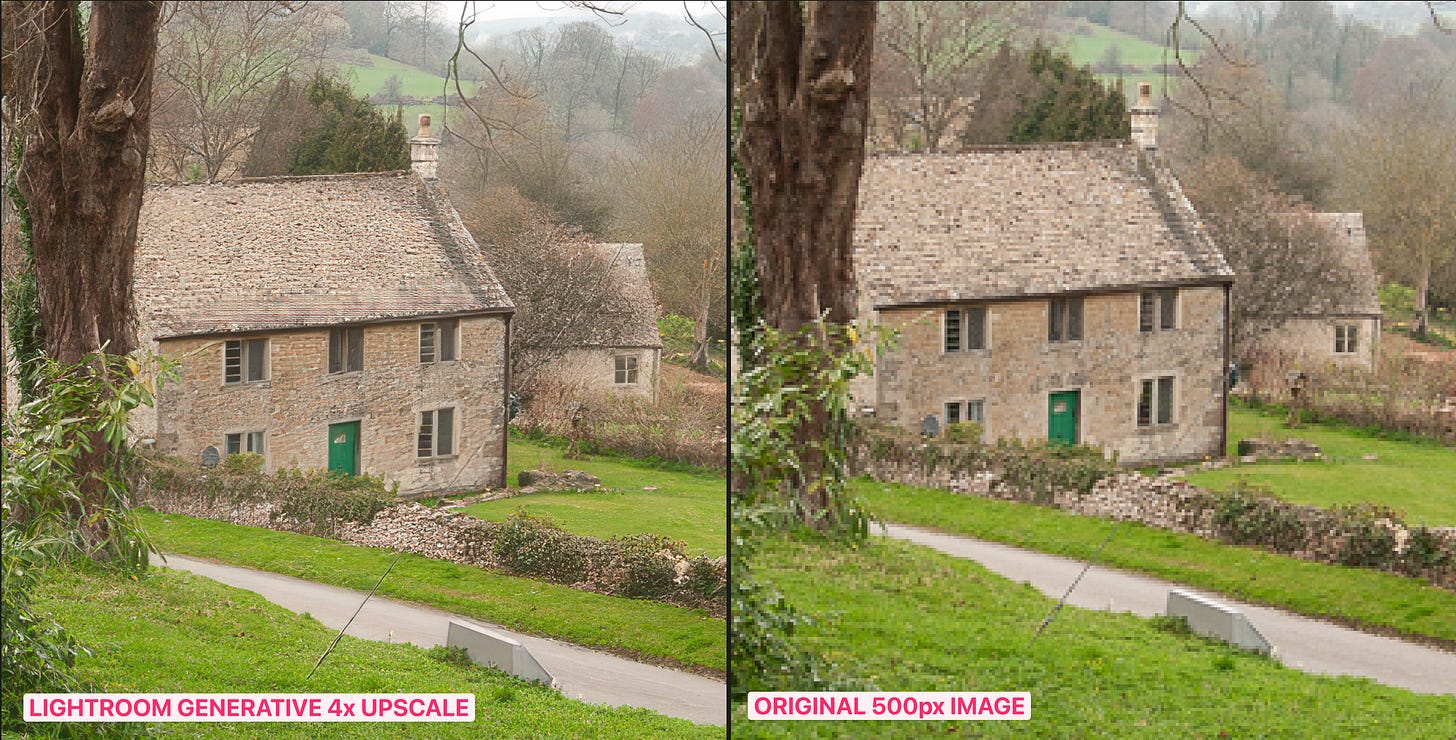
As to the quality of the upscales, they’re about as mediocre as you’d expect, even though (as I mentioned) Gigapixel is actually an island of relative competence in the ocean of mediocrity that is Topazlabs’ new subscription-only lineup. Does that mean I recommend using it? I guess? You get those 12 free upscales per month and, assuming 4x is a big enough upscale for you, you may as well spend your credits, particularly since they don’t roll over.
But you can get actually useable results using an alternative upscaler such as Crystal, which costs about 10 cents for a 4x upscale. In a direct comparison upscaling 4x from a 500px original of a Cotswolds scene, Crystal does a far, far better job of handling the detail, with the roof shingles, the dry stone wall, the foliage, the windows and literally everything else coming out significantly sharper and more natural.
Generate Using Firefly
Lightroom Classic users feeling left out by the omission of third-rate generative upscaling in the February release should take heart from the fact that they get generative editing instead.
The menu item is optimistically labelled ‘Generate Using Firefly’ but actually it gives access to GPT Image 1.5, Nano Banana Pro, Nano Banana, FLUX.2 pro, GPT Image 1, FLUX.1 Kontext Max, FLUX.1 Kontext Pro and… Adobe Firefly.
Weirdly, the Adobe Firefly option is labelled ‘Commercially safe.’ This means (according to Adobe) that any generative images do not “create content that infringes copyright or intellectual property rights and that it is safe to use for commercial and educational work.” And since Firefly is the only model in that ‘commercially safe’ category, the inference is that the very models Adobe implicitly approve of, by dint of the fact that they added them to Lightroom, are more than happy to create content that infringes copyright.
In any case, Lightroom has taken another left turn away from real photography and headed off down the AI rabbit hole. If you were uncomfortable using generative fill to remove rubbish bins from your landscape photos, then the full blown generative makeovers possible with models like Nano Banana Pro are going to make you want to lie down in a darkened room and reconsider your life choices.
Selecting the ‘Edit Photo’ option in that ‘Generate Using Firefly’ menu item launches your web browser and opens a web-based edit screen. Does this mean that your photograph has been uploaded to the cloud? It isn’t made clear, but since the models you’re using to edit the photograph are on a server somewhere in Iowa, it seems pretty likely, doesn’t it. Are you happy uploading your photographs to Google’s server farm and letting Nano Banana Pro have at your image?
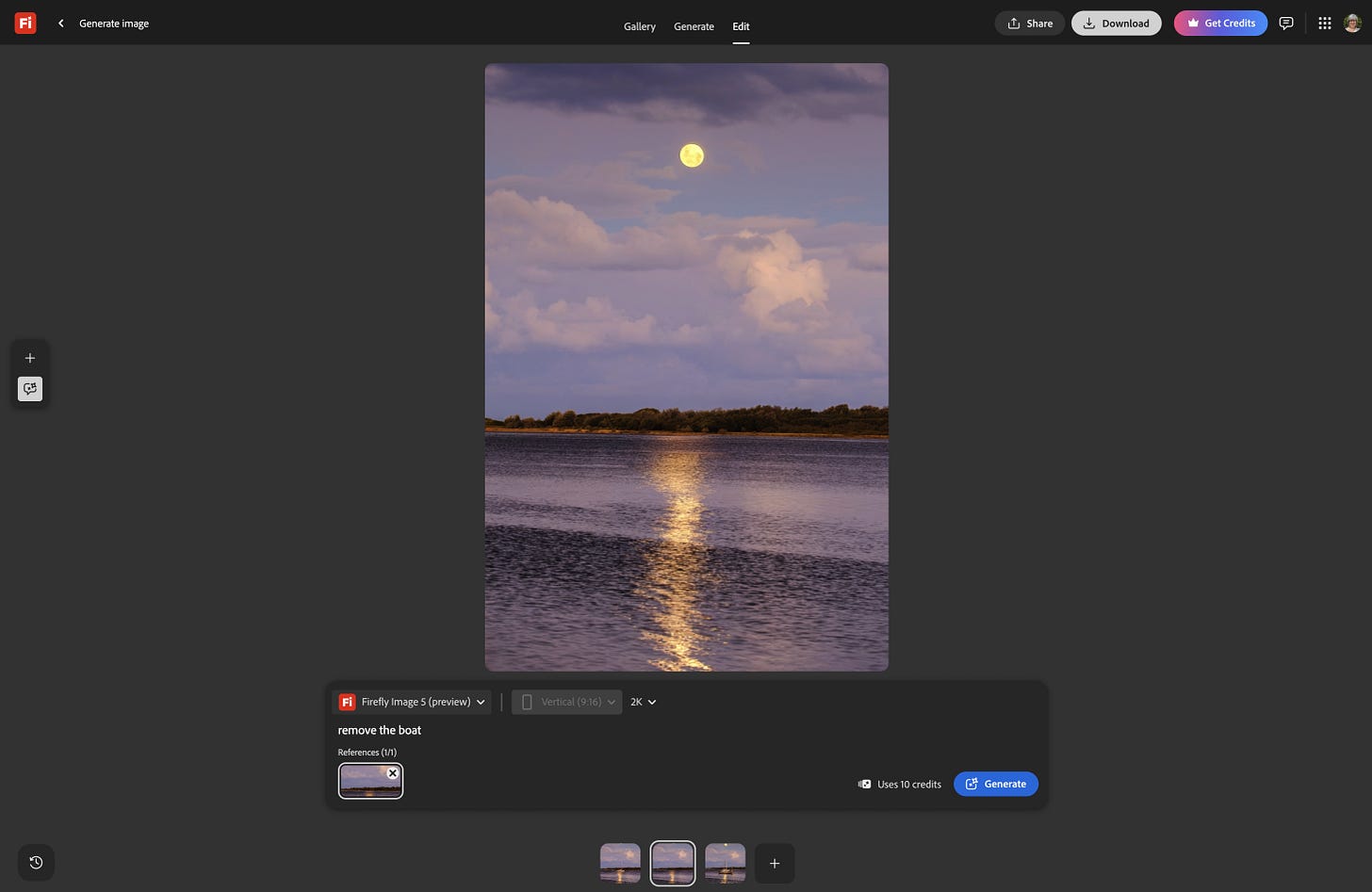
In terms of capabilities, the AI editing possible with this tool is excellent and it’s capable of producing great results. But before we get too excited about the results, it’s worth pausing to consider what you’re actually doing. When you use these tools, you’re not editing a photograph anymore, you’re generating AI artwork that happens to have your photo as a starting point. If you’re entering competitions, submitting work to clients, or presenting images as a record of a real place or moment, that is something you need to give serious thought to.
Like all of these new AI tools, Adobe does insist on hobbling them though. While most models can output images up to 4K in size, the priciest option, Nano Banana Pro, is limited to 2K output in the Adobe edit tool. If you’re working on a regular sized RAW file with a pixel resolution of something like 6000 pixels by 4000 pixels, the Nano Banana Pro output image will therefore be just 3000 x 2000 pixels.
Oh, and did I mention that each generative edit uses some of those bundled AI credits? GPT Image 1 is 60 credits a go, Nano Banana Pro is 40 credits and Flux is 20. So depending upon which model you use, you could eat through your entire monthly allowance of AI credits in just four edits.
Perhaps they want you to transfer the photo over to Lightroom Cloud and spend another 20 credits on a Topaz generative upscale.
Generate Video From Photo
Since Adobe hitched their wagon to the AI movement a long time ago, it was always inevitable that they’d add an AI video generation tool to their software. I’m just surprised that the app they chose to launch it with is Lightroom Classic.
And if you thought that the photo editing tool was eating through your 250 monthly credits quickly, then you’re going to love the pricing on the video creation tool. The Ray 3 HDR model costs an eye-watering 1,875 credits to generate a 5-second clip at 1080p. Even if you stuck to the modestly priced Veo 3.1 (400 credits a go) you can eat through an entire 4,000-credit allowance on the full Adobe subscription in 10 goes.
Once you’ve used the 250 credits bundled as part of the Adobe photography plan, you have to buy add-on packs priced at 2,000 credits for $10/month, 7,000 for $30/month, and 50,000 for $200/month. So, based on Adobe’s pricing, that one clip generated in Ray 3 HDR would cost you $10.
I decided to crunch the numbers on this to see what Adobe’s markup is, using that most expensive Ray 3 HDR model as the basis. Ray 3 is produced by Luma AI and a 5-second HDR clip costs 1,280 Luma credits at 720p, or 1,600 credits at 1080p. On their Plus plan ($29.99/month for 10,000 credits), that works out to roughly $3.84 for a 5-second 720p HDR clip, or about $1 for 1080p. Adobe charges you 1,875 of their credits for the same thing, which at the only available top-up rate ($10 for 2,000 credits) costs you $9.38.
So Adobe is charging roughly 2.5 times more for a generation using Luma’s own model than Luma charges you to use it directly. Adobe is essentially buying wholesale from Luma and reselling at a significant markup, baked inside a subscription you’re already paying for, using a credit currency that’s deliberately incomparable to Luma’s own.
The Other Stuff
In amongst all these generative imaging tools, Adobe have also updated their recently introduced AI culling tool. The original release of this tool was criticised for being either too demanding or not demanding enough, with no middle ground. I tested the tool on the photographs I shot at this year’s Berry Show and it did a reasonable job of flagging the out-of-focus images. But it’s pitched squarely at wedding and portrait photographers, according to Adobe, who state that it works best on individual portraits and headshots, and so it’s of limited use to everyone else. And I’ve heard elsewhere that actually it still sucks for headshots and other studio work.
The tool does now include batch actions, which means you can flag, rate, add a colour label or add to a collection based on the accept/reject criteria. But until they add a foreground-to-background focus evaluation feature for landscape photographers, this feature is going to remain unused in my Lightroom.
And lastly, Adobe added WebP support to Lightroom. If you’re not familiar with this file format, it’s become extremely popular in recent years primarily for web design because it produces smaller file sizes than JPEG without the visible quality loss. You can now import, edit, and sync WebP files. And while you can also export any imported WebP files to other formats, you can’t export out to WebP, which is almost certainly the most Adobe-ish limitation I’ve ever heard of.
Conclusion
So that’s the first update of 2026 from Adobe for us photographers: AI culling, AI photo editing, AI video generation, AI upscaling and partial support for the WebP file format. Adobe have relegated their own Firefly model to ‘when you run out of credits and are desperate’ status and thrown in with pretty much all of the leading generative AI companies.
We are inching closer to full prompt-based photo editing when you’ll instruct an AI agent via text or voice and it will carry out your edits. These additions to the core photography apps, along with the previous updates (generative expand, fill and remove), seem like steps along that road. Whether it’s ‘right’ or ‘wrong’ to take photo editing in this direction is a moot point because it’s happening anyway, but it’s definitely going to cost you more than that base subscription plan whether you’re grandfathered in on the old $10 deal or not.
As to the quality of these updates, it’s a mixed bag. The generative upscaling model, included thanks to a new partnership between Adobe and TopazLabs, is a load of shit. You only get 2x or 4x upscales, there are basically no configuration options, the results are only marginally better than I could do with a whiteboard and some multicoloured sharpies, and it is going to cost you 20 of your precious 250 monthly AI credits every single time you use it.
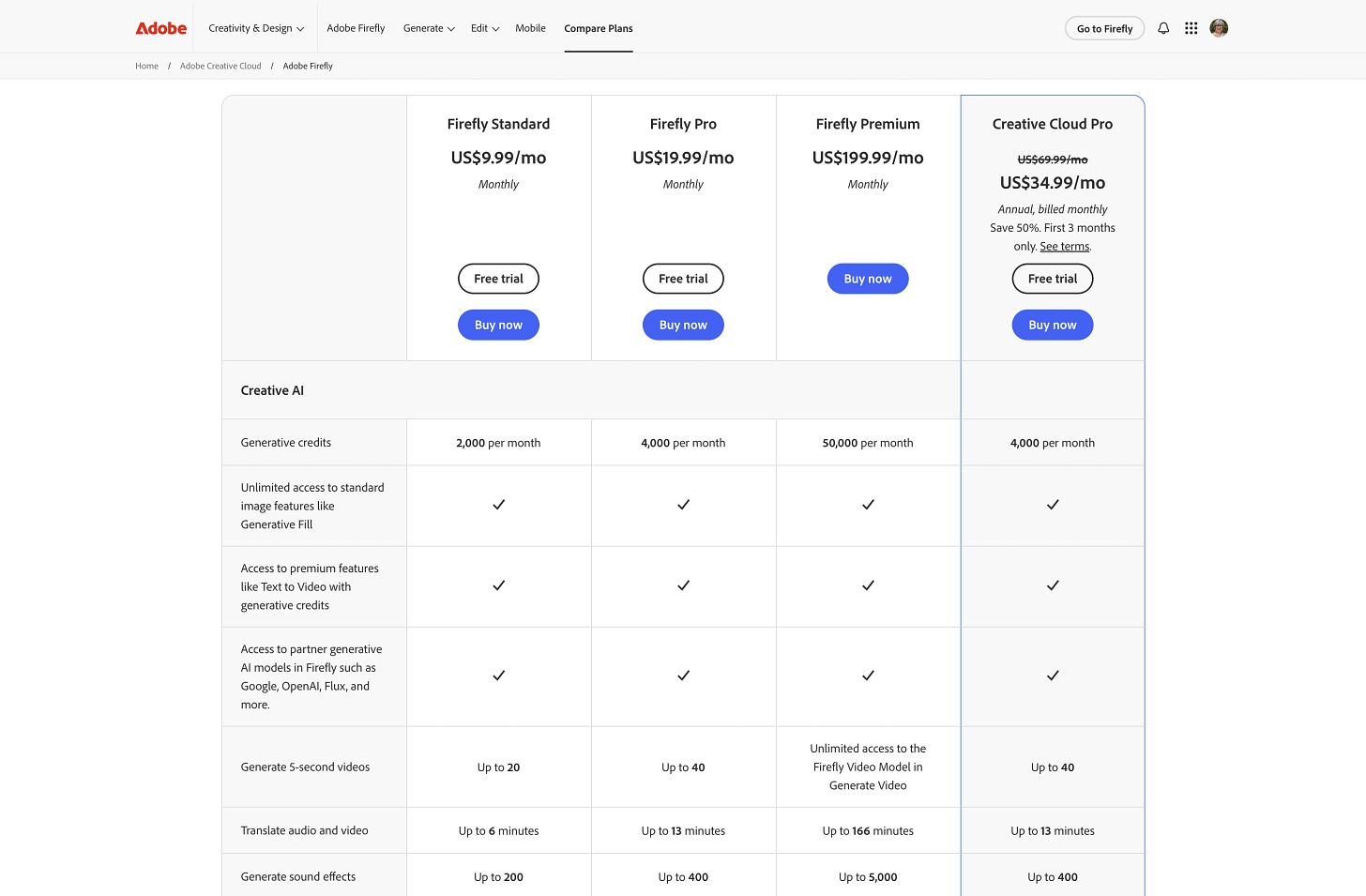
The generative editing is pretty competent thanks to the inclusion of excellent models like Nano Banana Pro, but edits take place in a browser window and not the app, get uploaded to the cloud, and cost between 20 and 60 AI credits per edit depending on which model you choose. Note that the most expensive option, Nano Banana Pro, also shrinks your full-size photo by half.
The photo-to-video generative tool is a ludicrously expensive gimmick that answers the question “what if it was my photograph, but worse and also moving?” The AI culling seems like it’s improved, but it’s also completely irrelevant unless you’re a studio or event photographer that hasn’t already moved over to Capture One.
So there you have it. $240 a year, and Adobe’s big vision for the future of photography is: fewer real pixels, more fake ones, and a monthly credit allowance that evaporates before you’ve decided if you actually like any of it.
Photography is in safe hands.
Also published in RAW & Unfiltered on Substack.